On this page
180 SharePoint Online sites. 29 clicks per site to configure the modern footer. That is 4,860 clicks.
I shared a tweet about programmatically configuring the new modern SharePoint footer and the response surprised me. Customers and colleagues alike were running the same maths and reaching for the same workaround. Here is the long-form of what I built and why.
Why I built this
One customer. 180 sites in a Hubified modern intranet. A standard footer they wanted applied consistently across the lot. Done by hand, the workflow looks like this:
- Settings → Change the look → Footer (three clicks)
- Enable footer, browse for a logo, upload, name the footer, apply, close (eight clicks)
- Edit links → add link → text → URL → save (one + four clicks), repeated for three more links (twelve clicks), then save the navigation (one click). Eighteen clicks for the links alone.
- Total: 29 clicks per site, on top of browsing to the site and typing every value correctly.
29 clicks × 180 sites = 4,860 clicks before factoring in the typing, the typos, and the inevitable “actually, can we change the wording?” follow-up from the customer.
TIP
Think lean. Anything you do on more than a handful of sites is worth automating before you start. Halfway through a manual rollout is the worst place to discover the customer wants the link text changed.
Centrally managed intranets, flat IAs, Hub-based architectures, all of them eventually run into the same problem: a setting that has to be applied site by site, with no inheritance from the Hub, and no first-party tooling to script it. The government department I had been working with on this rollout looks after close to 200 sites. A regulation change that needs a footer update on all of them is a single line of policy at the top and a 4,860-click problem at the bottom.
How it works, finding the API
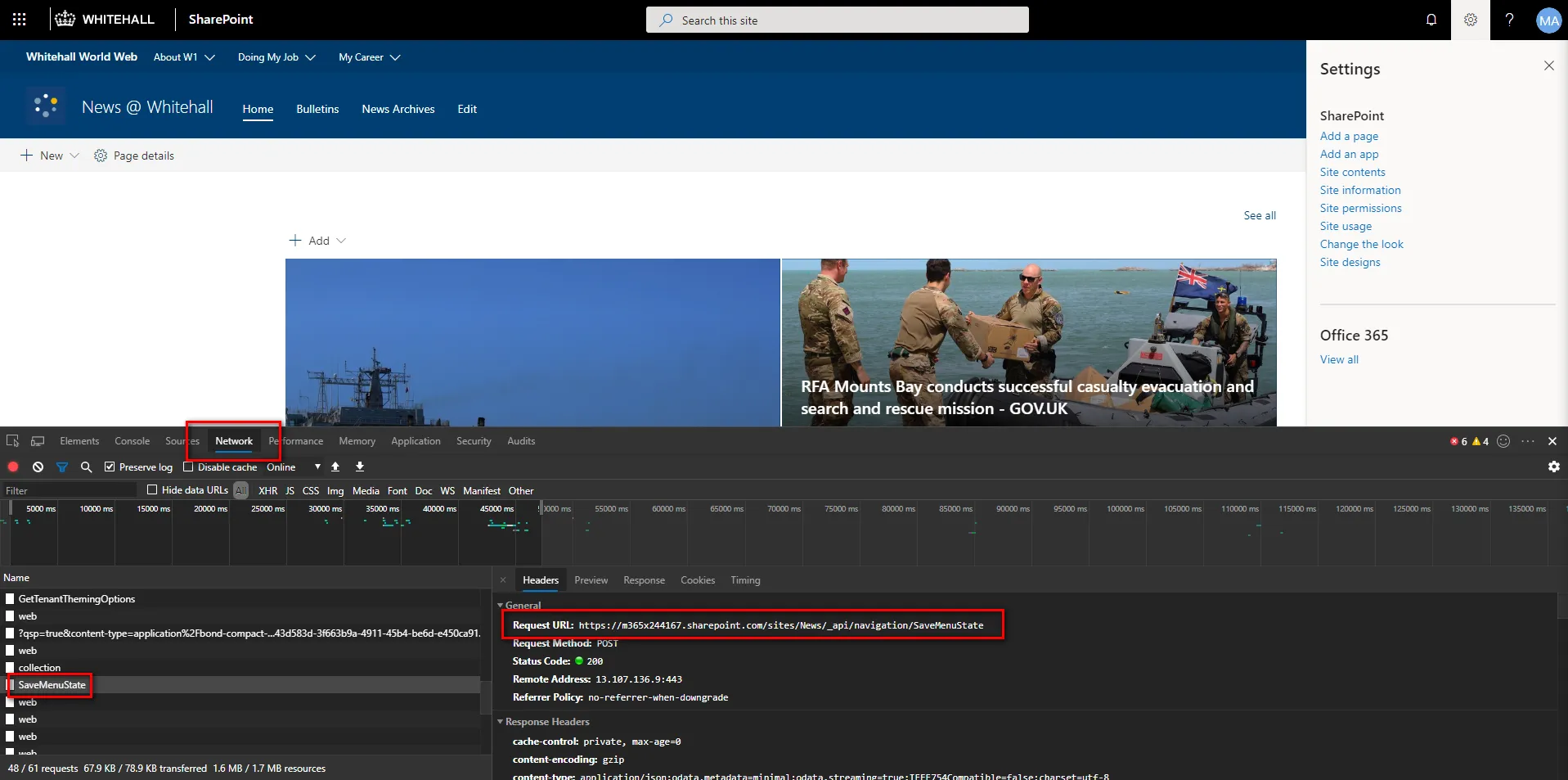
If the UI can do it, the UI is calling an API. So I ran the manual workflow against a Fiddler / Edge DevTools / Postman / VS Code lab and watched what came over the wire.
A colleague turned up the same find from a different angle, via some undocumented verbs in the site design schema (see Site design JSON schema on Microsoft Docs). At the time the footer only had site-design support, no first-party PnP cmdlets, no Set-PnPFooter. Whichever way you came at it, SaveMenuState was the door.
The build, testing in Postman
Postman was the right tool for the next bit. I registered a SharePoint app, gave it full tenant access for the lab, captured an auth token from AAD, and started replaying the captured payloads against the API.
Once I had every property mapped, enable / disable, logo, text, links, the PowerShell layer was the easy bit.
The PowerShell module
The code is functional rather than perfect. I built it as a set of small functions so each can be called independently, with the intent of contributing back to PnP later. The script and full sample usage live in this Gist.
$DebugPreference = "Continue"
Connect-PnPOnline -Url $siteUrl -Credentials $cred
# Enable the footer and set logo + textEnable-FooterSet-SPOFooterLogo -LogoUrl "/sites/intranet/SiteAssets/logo.png"Set-SPOFooterText -Text "Contoso Intranet"
# Add three linksSet-SPOFooterLinks -Links @(  @{ Title = "Privacy"; Url = "/sites/intranet/Privacy.aspx" },  @{ Title = "Accessibility"; Url = "/sites/intranet/Accessibility.aspx" },  @{ Title = "Contact us"; Url = "/sites/intranet/Contact.aspx" })
The function surface, at a glance:
| Function | Purpose |
|---|---|
Enable-Footer / Disable-Footer | Turn the footer on or off on a site |
Get-SPOFooter / Set-SPOFooter | Read or apply the whole footer configuration |
Get-SPOFooterText / Set-SPOFooterText | Footer name / text only |
Get-SPOFooterLogo / Set-SPOFooterLogo | Footer logo only |
Set-SPOFooterLinks | Replace the footer navigation links |
The links function is the part I would refactor first. It currently hard-codes the JSON payload structure; a future revision should lean on the existing Get/Add/Remove-PnPNavigationNode cmdlets so the same building blocks underpin every nav surface.
Quirks to be aware of
A few things tripped me up while building this. They are worth knowing.
WARNING
Auth tokens expire mid-session. When running this in Postman across a long debugging session, the AAD token will silently expire and the API will start returning unhelpful errors. Refresh the token, then retry the call.
Get-PnPSite does not expose $site.FooterEnabled. There is no first-party property to tell you whether the footer is on or off, which is why the module ships its own Get- functions: they parse the live SaveMenuState response.
The configuration also turns out to have four reachable states, not two:
- Disabled.
- Enabled with no configuration.
- Enabled, but the JSON looks similar to the disabled state.
- Enabled with full configuration and links.
The Get- functions handle all four, but state #3 is the one to test against if you write your own.
Next on the bench
I want to take this to Vesa and the PnP team to see whether there is a path to upstream it. The code is in the Gist for anyone who wants to use it now. If you ship a flavour of your own, I would love to see it, more in the same vein over on the app dev topic page.
4,860 clicks down to a single PowerShell run. #ThinkLean. #SharingIsCaring.