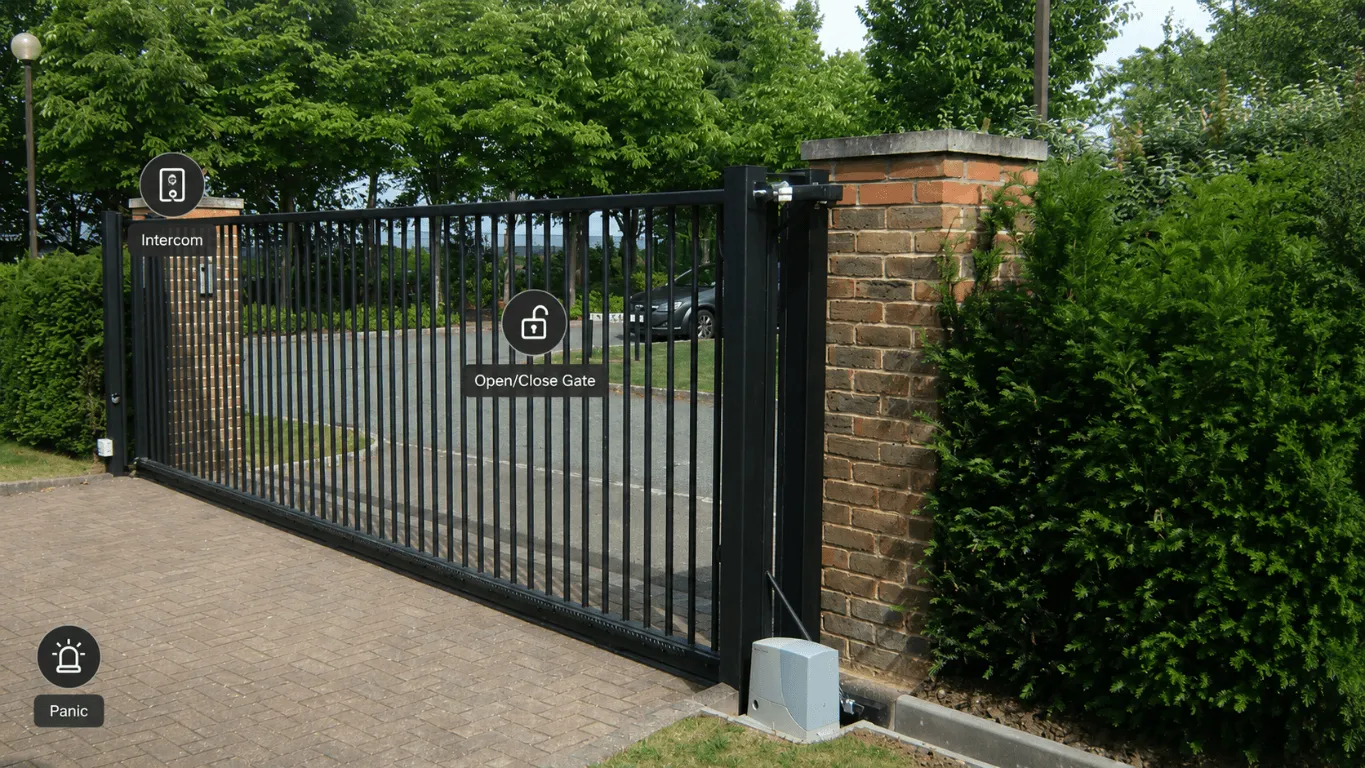
Four shortcuts on the G6 Instant over L’s cot: start the lullabies, toggle play/pause on the Sonos, switch to the submariner’s red night light, spin up the sensory colour loop in the nursery. One Home Assistant webhook handles all of them, courtesy of the new webhook shortcuts in UniFi Protect 7.1.55.
UniFi pushed the update this evening. The release note itself is dry: “Added support for creating webhook shortcuts.”
The first-run experience doesn’t walk through creating a shortcut, but it adds context with a teaser image. A picture paints a thousand release notes.
I had to wire one immediately.
A few days ago we swapped a Tapo C840 over L’s cot for a UniFi G6 Instant. The Tapo is a capable camera (great over-cot stand, decent PTZ), but its sluggishness and apparent cloud dependency had been nagging at me; that’s a longer story. Fast, private, and entirely local: the G6 feeds into the same Protect instance as every other camera in the house. That means one app, proper Home Assistant integration, and local edge-AI detections (crying, motion, person, vehicle, among others) that already replace a stack of cloud-dependent integrations and automations I was running off the Tapo. Shortcuts are the other half of the same idea: instead of an event firing an automation, I can fire one myself from the camera feed.
L’s cot and the room it’s in are well-kitted, this is a smart home after all: Sonos Roam in a bracket, a Bluetooth-controlled motorised mobile, smart lighting, climate control. Home Assistant is the daily driver for all of this: dashboards, automations, the lot. The Protect live view is a different touchpoint: if I’m in the app checking the feed, I can now trigger something without switching apps. That’s the gap shortcuts close.
Why one webhook, not many
My first instinct was to ask GitHub Copilot (GHC) to wire a webhook for “play lullabies”. It did, fast enough that I had something working before I’d properly thought it through. Then I counted the cameras I have in Protect and stopped.
The naive shape is a dedicated webhook per action. That doesn’t scale: as shortcuts multiply across cameras, each one drags in its own automation that duplicates the same structure, differing only in the final action. The interesting bit (which Sonos favourite plays, which light scene to trigger) ends up buried in an avalanche of near-identical YAML.
The cleaner shape is one webhook, one automation, and a query parameter that says which shortcut fired:
https://homeassistant.example/api/webhook/UnifiShortcut?action=CotSonosPlayLullabiesThe automation routes on trigger.query.action and does whatever that name implies. Adding a new shortcut becomes a new choose block, nothing else.
The Home Assistant automation
alias: UniFi Protect Camera Shortcut Webhooksdescription: Webhook triggers for UniFi Protect camera shortcutstriggers: - webhook_id: UnifiShortcut allowed_methods: - GET - POST local_only: true trigger: webhookconditions: []actions: - choose: - conditions: - condition: template value_template: "{{ trigger.query.action == 'CotSonosPlayLullabies' }}" sequence: - action: media_player.volume_set target: entity_id: media_player.sonos_cot data: volume_level: 0.25 - action: media_player.play_media target: entity_id: media_player.sonos_cot data: media: media_content_id: FV:2/185 media_content_type: favorite_item_id metadata: {} - conditions: - condition: template value_template: "{{ trigger.query.action == 'CotSonosPlayPause' }}" sequence: - action: media_player.media_play_pause target: entity_id: media_player.sonos_cot - conditions: - condition: template value_template: "{{ trigger.query.action == 'CotNightLight' }}" sequence: - action: scene.turn_on target: entity_id: scene.cot_night_light - conditions: - condition: template value_template: "{{ trigger.query.action == 'CotColourLoop1h' }}" sequence: - action: script.colour_loop data: room: nursery minutes: 60mode: queuedA few things to call out:
local_only: truemeans the webhook only fires when called from inside the network. UniFi Protect is on the LAN; there is no reason to expose this on the open internet.mode: queuedkeeps rapid presses from clobbering each other. Tap “play lullabies” twice in quick succession and the second request waits its turn rather than racing the first.- The action names (
CotSonosPlayLullabies,CotNightLight) follow<Where><What><Verb>, so a glance at the URL tells me what the shortcut does without opening the automation.
Wiring the shortcuts in UniFi Protect
UniFi Protect already had shortcuts for jumping between cameras in the live view. 7.1.55 extends that same mechanism to include webhooks. Each shortcut bubble on the live view now accepts a target URL. Pointing them at the same webhook with different action values is all that’s needed:
CotSonosPlayLullabies: start the lullabies playlist at bedtime volumeCotSonosPlayPause: toggle play/pause on the RoamCotNightLight: switch to the submariner’s red night light sceneCotColourLoop1h: spin up the sensory colour loop for 60 minutes
Same URL, different query string, different outcome.
Adding the next shortcut
Each new shortcut is one choose branch in the automation and one shortcut bubble in Protect. The pattern scales the way I want it to: dim the cot lamp, pause the lullabies, mute the Sonos for an hour. All routed through one URL, all surfaced one tap away on the camera I’m already watching.
What UniFi should do next
UniFi, if you’re listening: an icon picker for shortcuts.
What I’d do differently
The cot use cases are largely there. What’s next is more like security arm/disarm, a couple of lighting scene shortcuts, and quick triggers for when Poppy is home alone: a treat launcher and some ambient music and lighting, an extension of the training buttons I built her. The router handles those the same way; the only change is a new choose branch.
The one thing I’d revisit is naming. The current <Where><What><Verb> PascalCase pattern (CotSonosPlayLullabies, CotNightLight) holds up, but it’ll want separators once the list spans more rooms and devices, to stay readable without opening the automation to remember what it does.
One webhook, four shortcuts, one room sorted. The pattern’s the same for the next room and the one after.